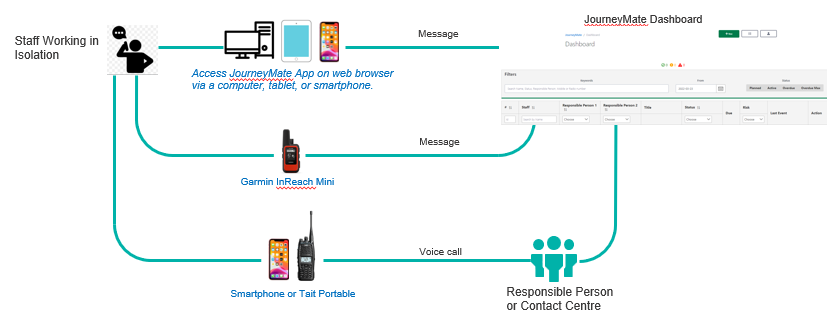
Under the Working Alone or in Isolation Policy workers must implement a check-in schedule. There are various devices available to help (refer to the diagram below).
- Choose the right device based on the remoteness of activity, level of risk and other factors such as environment and communications coverage.
- Refer to the Calculating Risk Level of Activity page for more about risk categories, calculating risk level and the recommended risk control devices.
As a guide:
If the travel/activity is in an area with good mobile phone coverage:
- Use JourneyMate to check-in as agreed with your Responsible Person.
OR
- Check-in by phone call.
- Check-ins by phone call or SMS are manually recorded on your behalf in JourneyMate by the Responsible Person.
OR
- Use your Garmin InReach Mini to start your activity*; check-in; and finally check-out – via pre-set messages.
Click here for instructions.
If the travel/activity is in an area with good radio coverage (95% of Victoria)
- Check-in in via DEECA issued Tait 9400 portable radio
- This device supports messaging and voice calls
- Location details can be shown in eMap
- Fire Look Out Observer (FLO) standard radio check-ins may also suffice.
If the travel/activity is in an area with poor or no radio coverage
- Use a DEECA-issued Garmin inReach Mini * if the activity or travel is in a known radio blackspot
- Click here for instructions.
* If your team shares a Garmin InReach Mini – and that unit’s number is recorded against multiple planned Activities – we strongly suggest you Start a specific Activity using the JourneyMate web app (or request someone Start it for you). Once started, you can then use the Garmin to check-in and check-out.
If you press the Start Activity key on the Garmin unit, it will assume you wish to start the oldest Activity – i.e. the one with the lowest Activity ID number- which may not be the one you want.