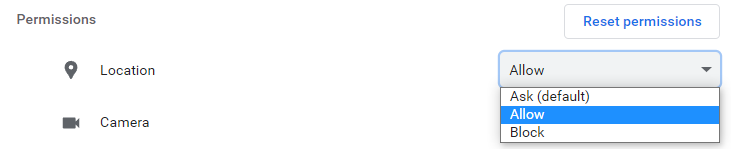
If you have selected Block on your browser’s Location settings, you will need to change your settings to allow Location (required for the JourneyMate app to show your location).
The following are instructions for allowing your browser to access your location details.
For mobile devices:
- Open Settings
- search for ‘Location’
- Look for ‘App Permissions’
- Select your browser (eg. Chrome)
- Select ‘Allow only while using the app’.
Note, instructions may vary with different operating systems.
For Person Computers using Google Chrome (our recommended browser):
- Select Settings (by clicking the
 at the top right of the page)
 - Under ‘Search Settings’, type “site settings”
- Under the Permissions heading, click Location

- Under the ‘Not allowed to see your location’ section, find tarnook.ffm.vic.gov.au

- You can either:
- click Delete (to allow the option to appear next time you open the site) OR
- click on tarnook.ffm.vic.gov.au then under Location, select ‘Allow’ from the drop-down menu.